Breaking Changes
This page describes breaking changes of POS Actions API.
Returnable container items (2026-10)
Since Dotypos 2.19, a returnable container (for example a deposit bottle) can be assigned to a product in Dotypos. When such a product is added to an order through POS Actions, the POS adds the container as a separate order item, the same way it does for orders created on the POS. See Returnable containers.
The change affects only accounts where a returnable container is assigned to a product. For these accounts:
items[]in the response contains items that were not sent in the request. A container item follows the item it belongs to and hasparent-item-idandparent-item-relation-typeset.- The order total includes the price of the container items.
- Container items can't be split on their own. They are moved with the item they belong to.
Migration
- Do not assume that the response contains only the requested items. Use
parent-item-idto match a container item to the requested item. - When splitting an order, send only the items without
parent-item-idinsplit-items.
Cheapest item gratis applies to a single unit (2026-09)
Since Dotypos 2.19, the cheapest item gratis rule of a Product Customization group makes only one unit of the cheapest selected Customization Item free of charge. This applies to orders created through POS Actions as well as orders created on the POS.
The cheapest item is determined by the prices of the group's price level, the same prices the items are charged with. Previously, the default product prices were compared, so in a group with a price level a different item could be made free of charge.
Previously, when a customization item was sent with qty greater than 1 and it was the cheapest selected item in a group with this rule, all of its units were free of charge.
For such an item, items[].customizations in the response now contains two entries with the same product-id:
- the paid units, with
quantityreduced by one unit and the regularunit-price, - the free unit, with
unit-price0.
Items with qty 1 are not affected.
Migration
- Expect the order total to include the price of the paid units of the cheapest item.
- Do not assume that a product appears at most once in the customizations of an order item. Sum the entries by product if you need the total quantity.
Multiple quantity customization items (2026-04)
Beginning with Dotypos version 2.17, there will be a new possibility to add multiple quantities of a Customization Item to Order Item. It will allow covering the situations like BOGO, 2+1 or multiple toppings of the same type.
Early access and testing
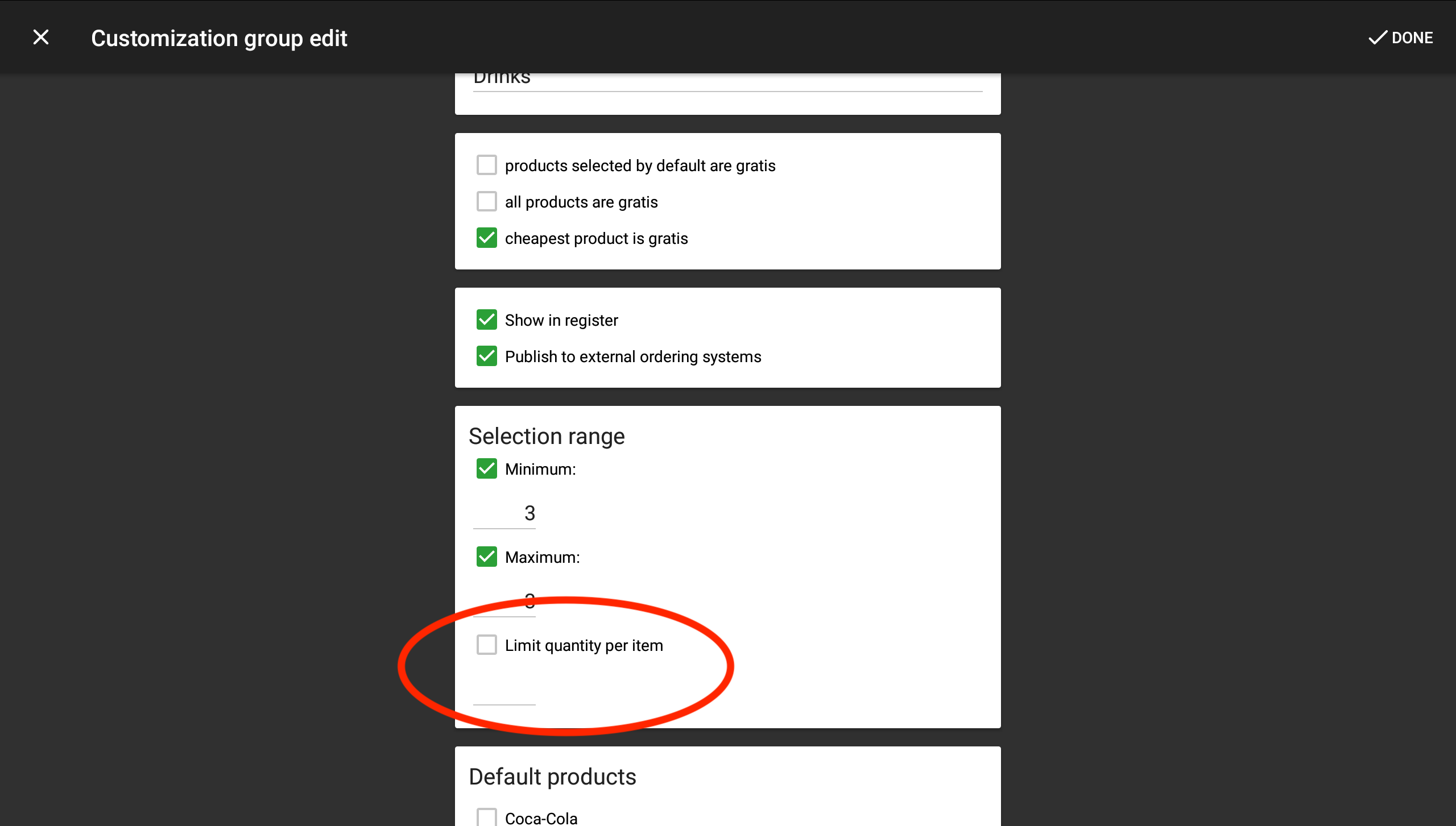
To test the compatibility of your integration with this change, you can use the Developer Mode in the Dotypos application (in versions 2.16 – 2.18). After activating Developer Mode, you will be able to configure individual Product Customizations Item limits. The default behavior remains unchanged – the quantity is still limited to 1 per Customization Item.
General availability (Dotypos 2.19)
Since Dotypos 2.19 the Limit quantity per item option is available in the Product Customization group settings for every user, without Developer Mode. The default value is still 1 per Customization Item, so existing configurations keep the previous behavior.
When the limit is raised or disabled, the cashier can select the same Customization Item several times on the Dotypos combination selection screen (as well as in Mobile Waiter). Orders created this way carry the selected qty on the customization item and are reported to your integration exactly like orders created through POS Actions with qty greater than 1, including the cheapest item gratis rule.
API changes
During January 2026 we will publish updated Product Customization endpoints which will include the new field for the quantity per item limitation.